
Features
Everything the app does, layer by layer
An AI-powered dictionary for finding the words your English is missing, practice by speaking, seeing and listening, review on the right day, progress measured word by word, and goals that keep you coming back. Here’s every feature, what it does and what you get out of it.
Layer 01 · Discovery
Find the words you’re missing
It all starts with a word you don’t know. You look it up, decide whether it’s worth it, and pick the sentences you want to learn.
Quick diagnostic
First launchThe first time you open the app, a short diagnostic asks what you want English for: travel, work, general use. Your answer sets the starting direction for your words and your study.
What you get: you start with words tied to your goal, not a random list.
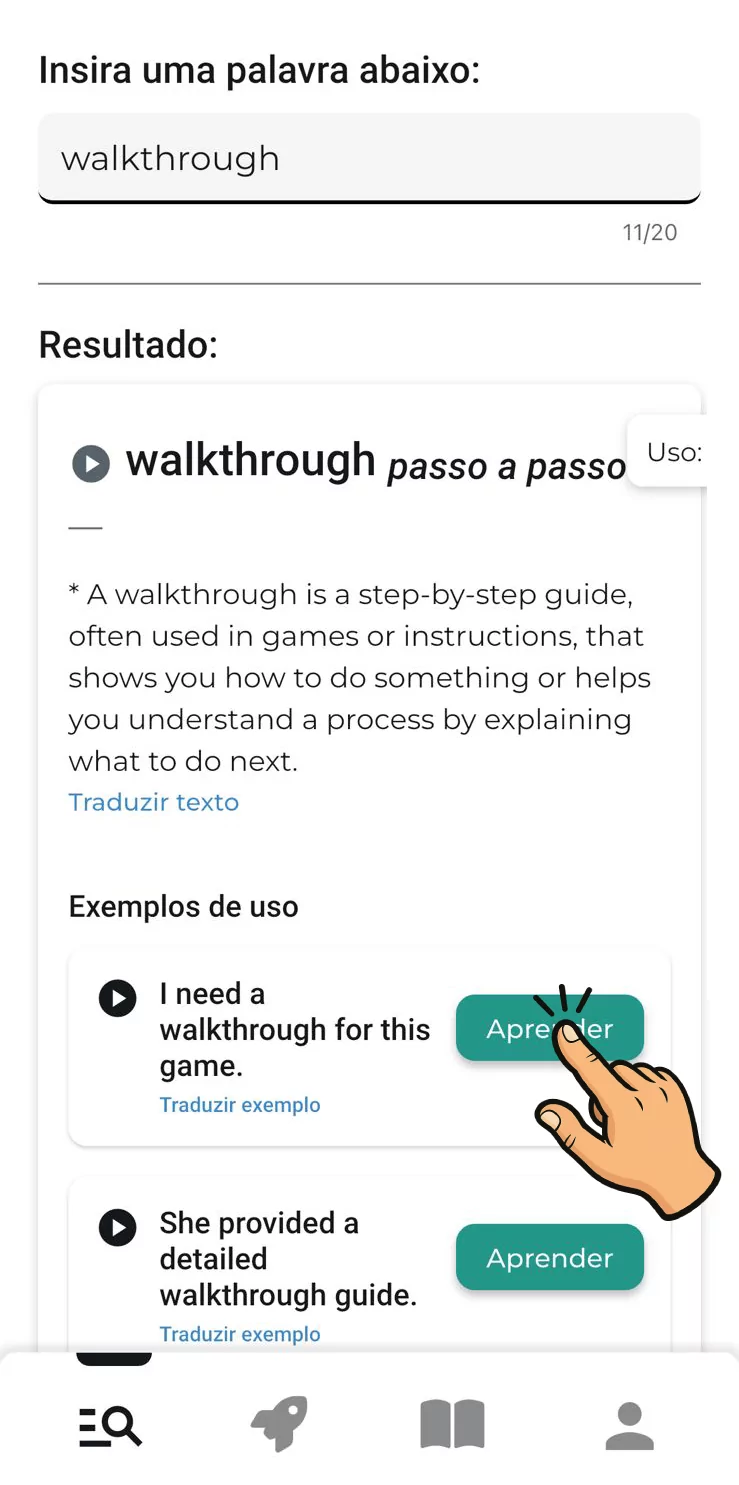
AI-powered dictionary
Any fieldLook up words, expressions and phrasal verbs from any field: the slang from last night’s episode, a technical term from work, the call it off that stopped you mid-email. Each result shows the meaning and how it’s used.
What you get: you study what actually shows up in your life, not a list everyone else gets too.
Why: the words intermediate learners are missing rarely show up in courses or generic content. The words your English is missing
Example sentences with audio
5 or more per wordEvery search brings back at least five example sentences that use the word, with audio. Since the same word shows up in several sentences, your reviews bring it back in different contexts: you see which words it pairs with, the tone it carries and how it sounds.
What you get: you learn the word the way people actually say it, not as an entry on a list.
Why: knowing that swamped means “overloaded” is one thing; catching I’m swamped this week at full speed is another. Why sentences beat single words
Learning list
Your pickLike an example? Tap Learn and the sentence goes on your learning list. Nothing gets added unless you choose it, so the list reflects you: the sentences you actually want to be able to use.
What you get: your practice is built from your own material, and every sentence you pick gets practiced and reviewed.
Stories
30 sentences eachShort stories, 30 sentences each, for building vocabulary with words in context. They’re a good place to start if you’re closer to the beginning and don’t have many words of your own to look up yet.
What you get: you grow your vocabulary with sentences that build on each other, even before your list gets long.
Layer 02 · Practice
Practice every sentence three ways
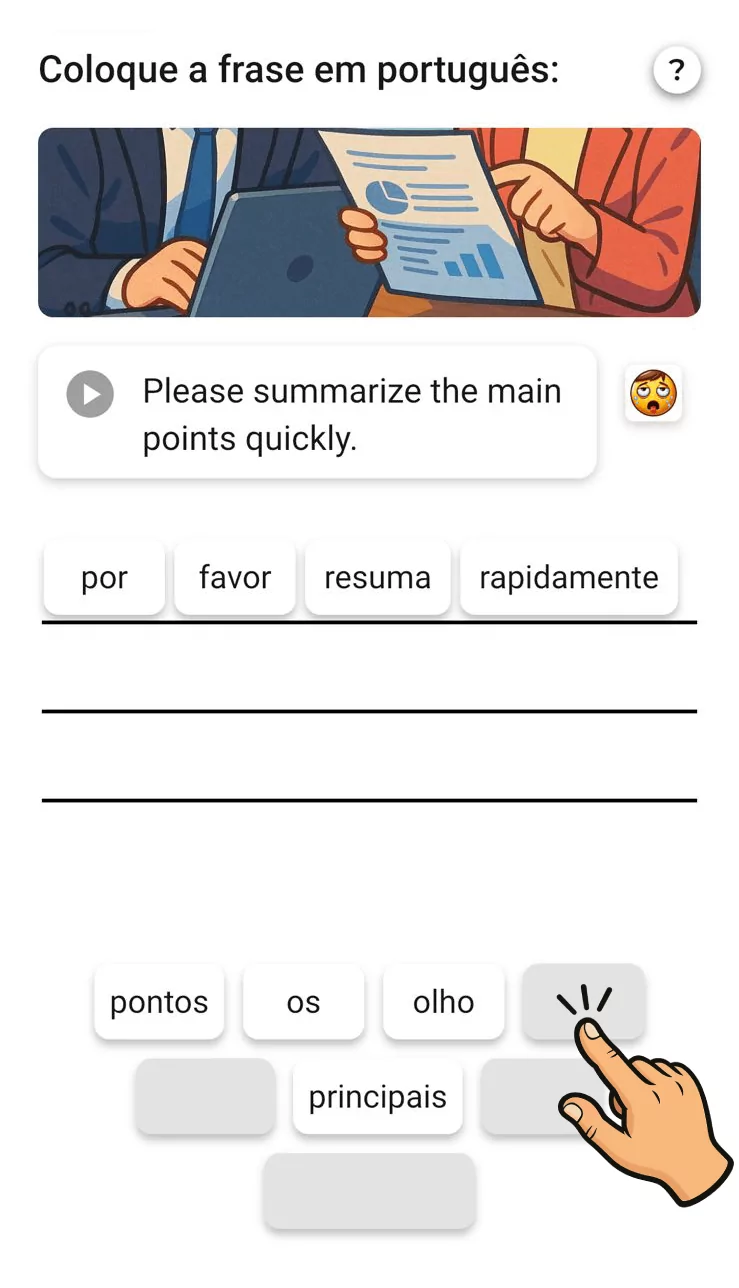
The sentences on your list turn into practice sessions in three modes: speaking, seeing and listening. Each one works on a different part of what it takes to really use a sentence.
10-sentence sessions
As many as you likePractice happens in sessions of 10 sentences. Finished one? Start another: as long as there are sentences to study, you can do as many sessions as you want. In our testing, a session took 4 to 5 minutes for experienced learners and up to about 25 minutes for people closer to the beginning.
What you get: you study in short blocks and stack a few sessions until you reach 20 to 30 focused minutes a day.
Speaking
Speech recognitionYou say the sentence out loud, and the app uses speech recognition to show what it heard. If something didn’t match, you get a pronunciation tip spelled out the way a Brazilian would read it. This is the mode for people who understand English but freeze when it’s their turn to talk.
What you get: the sentence moves off the list and into your mouth, which is exactly where it gets stuck in a real conversation.
Research: the vocabulary learners recognize is larger, and grows faster, than the vocabulary they can use (Laufer, 1998; Webb, 2008). I understand English but can’t speak it
- The sentence
- I should have known better.
- What the app heard
- I should have no better.
- Pronunciation tip
- ai xúdav nôun bérer
Illustrative example. The tip uses Portuguese spelling. Speech recognition helps you practice, but it isn’t a full phonetic assessment. Seeing
VisualYou practice the sentences with what you see on screen. The written form locks in the spelling and the words that travel together, like the off in call it off, which almost disappears in fast speech.
What you get: you start to recognize how the sentence is built, not just its general meaning.
Listening
AudioYou practice the sentences by ear. It’s built for the gap between reading the subtitle just fine and missing the same line when someone says it fast, on a show or in a meeting.
What you get: you get used to the sound of the whole sentence at the speed people actually talk.
Layer 03 · Retention
Review it before you forget it
Once a sentence is on your list, the app handles when it comes back. No calendar to build, nothing to remember to review.
Spaced repetition
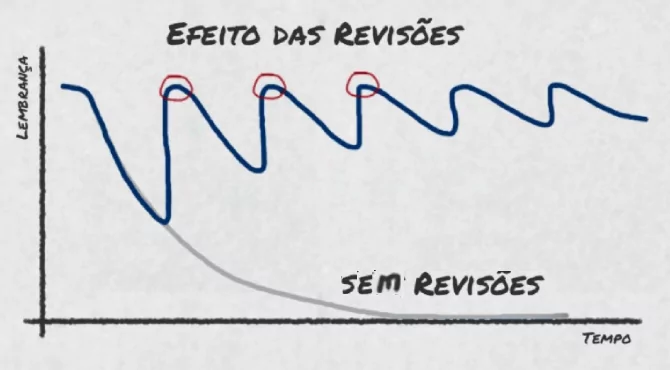
AutomaticEvery sentence on your list comes back for review on a schedule of growing intervals. Get it right and it moves up a step and comes back later; get it wrong and it moves down a step and comes back sooner. There’s no daily cap on reviews.
What you get: you spend less time on what you know and more on what’s slipping, with no schedule to manage.
Research: a meta-analysis of 48 second-language experiments found a medium-to-large effect for spacing (Kim & Webb, 2022). Spaced repetition explained
Get it right every time and the sentence comes back in:
- Today1st practice
- 1 dayday 1
- 3 daysday 4
- 5 daysday 9
- 7 daysday 16
- 14 daysday 30
- 28 daysday 58
- 54 daysday 112
Get it wrong and the sentence moves down a step. Miss the review that came after 7 days, and it comes back in 5 instead of 14. Miss it right at the start, and it comes back tomorrow.
The app’s actual schedule, counted from your first practice. Get it right every time and that’s 7 reviews over about 4 months. Review inside the practice modes
Recall, don’t rereadReviewing isn’t rereading a sentence next to its translation: the sentence comes back in the practice modes, speaking, seeing and listening. It’s the effort of remembering, not the feeling of familiarity, that makes memory stick.
What you get: the sentence is there when you need it, not only when it’s sitting in front of you.
Research: a week later, students who kept being tested recalled about 80% of the words; those who stopped recalled 36% and 33% (Karpicke & Roediger, 2008). Why you forget the English you study
Layer 04 · Progress
See what’s already yours
We track your learning word by word. Every sentence you practice adds to your overall vocabulary.
Word-by-word progress
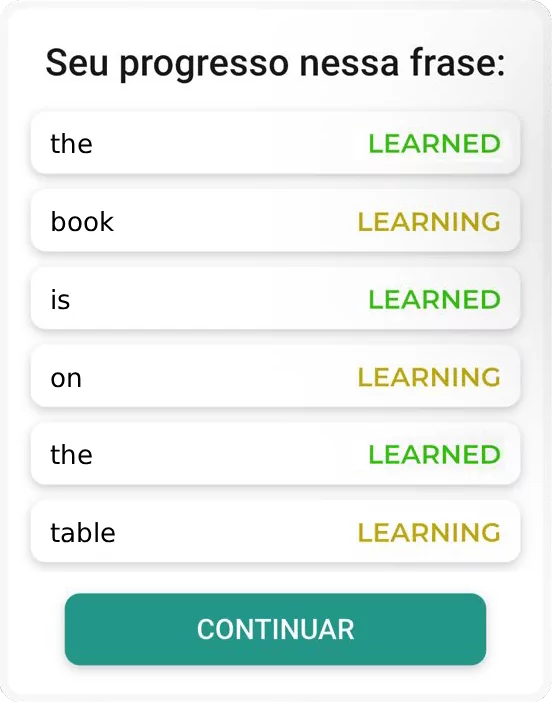
Correct ÷ seenFor every word, the app counts how many times it has come up in practice and how many times you got it right. Once your hit rate passes a set threshold, the word is marked learned and stops being a focus. In each sentence, you see which words are learned and which are still in progress.
What you get: you know exactly where you are, without relying on a vague sense that you “kind of” know it.
Overall vocabulary
Every sentence you practice adds to your overall vocabulary. Instead of tracking a pile of finished sentences, you follow the vocabulary that’s actually yours, which is what changes when you watch, read or talk.
What you get: you see the payoff of practice where it matters: the words you now own.
Next sentences, prioritized
AutomaticOnce every word in a sentence is learned, the sentence leaves active study and the app moves the next ones on your list up. You don’t have to decide what comes next or spend a session on what you’ve already mastered.
What you get: every session goes to what’s still missing.
Layer 05 · Consistency
Keep the pace, with people who study too
Vocabulary grows with regular study. A daily goal, a streak and friends help you come back tomorrow.
Daily goal
You set itYou choose how much you want to study each day: 10 minutes, 15 minutes or more. Hit your goal for the day and you earn a star.
What you get: a clear target for every day, sized to your routine.
Streak
Days in a rowThe app shows how many days in a row you’ve kept going. Watching the number climb is one more nudge to come back tomorrow.
What you get: studying becomes a habit, and regular reviews do more than the occasional marathon.
Research: 38 repetitions spread over three days had the same effect as 68 done in a single day (Ebbinghaus, 1885). Spaced repetition explained
Compete with friends
Week and monthAdd friends and compare how much each of you studies over the week and the month, with two markers: study time and stars, one for each day you hit your goal. Someone who studied 7 days might have 7 stars and 1 hour; someone who put in 4 hours over 4 days, 4 stars. You decide which counts more.
What you get: a bit of friendly competition to protect what matters: more study time on what you need to learn.
Layer 06 · Quality
AI writes it, you flag it, a person reviews it
dailyBe’s sentences and audio are generated by AI. That’s what lets you look up any word from any field. And, like any AI, it can get things wrong.
AI generates
The example sentences and audio for each word are created by AI, not pulled from a hand-written sentence bank.
You report
Found a sentence with the wrong pronunciation or translation? Report it right inside the app and say what’s wrong.
A person reviews
Reported sentences go through human review. Reporting is how mistakes the AI makes get caught.
What this means in practice, the limits of AI-generated content and the research behind the method are all on our methodology page.
Coming soon
What’s next
Only features confirmed for the app make it onto this list. None of them has a date yet.
- Offline studyNo date yetDownload sessions to practice without a connection. Right now the app needs internet to work.
- More languagesNo date yetGerman, Spanish, Italian and French. Right now dailyBe is for English only.
Subscribers get new features first. See the plans.
Teachers, schools and companies
Want to use dailyBe with students or with a team?
Today the app has a friends screen: you can add people and follow each person’s study time and stars over the week and the month.
For teachers, schools and companies, we can build screens for tracking student progress, with the right consent terms, on request. Tell us what you need.
- English teachersYou hand your students vocabulary and want them practicing it between lessons.
- Schools and language programsYou want to offer vocabulary practice alongside what’s taught in class.
- CompaniesYour team works in English and needs the vocabulary of its own field.
FAQ
Questions about the features
What can I look up in the dailyBe dictionary?
Words, expressions and phrasal verbs from any field: vocabulary from shows, terms from your job, words from a book or an email. For each search, you get the meaning and at least five example sentences with audio.
How does speaking mode work?
You say the sentence out loud, and the app uses speech recognition to show what it heard. If it didn’t match, you get a pronunciation tip spelled the way a Brazilian would read it, like “róu ariu?” for How are you?. It’s a practice aid, not a full phonetic assessment: accent, background noise and your microphone also affect what speech recognition picks up.
How long is a session?
Each session has 10 sentences. In our testing, one took 4 to 5 minutes for experienced learners and up to about 25 minutes for people closer to the beginning. You can do as many sessions as you like while there are sentences to study; we recommend 20 to 30 focused minutes a day in total.
How does the app decide when a sentence comes back?
With spaced repetition, on a ladder of intervals of 1, 1, 3, 5, 7, 14, 28 and 54 days. Get it right every time and a sentence you practice today comes back tomorrow, then in 3, 5, 7, 14, 28 and 54 days. Each right answer moves the sentence up a step so it comes back later; each wrong answer moves it down a step so it comes back sooner. Once every word in a sentence is learned, it leaves active study and the app moves the next ones on your list up.
Who creates the sentences and the audio?
An AI. That’s why the app can generate examples for words from any field. Like any AI, it can make mistakes: if you find a sentence with the wrong pronunciation or translation, report it in the app and it goes through human review. The details are on our methodology page.
What’s free in dailyBe?
You can use the app for free. The free plan’s limit is the number of dictionary searches per day. A subscription raises that limit tenfold and gets you new features first.
See:Plans
Does the app work offline?
Not yet. Downloading sessions to practice without a connection is on the roadmap, with no date yet.
Can I use dailyBe with a class or a team?
Today there’s a friends screen where you can follow each person’s study time and stars. For classes and teams, we can build screens for tracking student progress, on request. Email us at contato@dailybe.app.
Get the app
Start training the words your English is missing today.
For iPhone on the App Store and for Android on Google Play.